mirror of
https://github.com/misode/misode.github.io.git
synced 2026-04-23 23:27:09 +00:00

153 lines
4.6 KiB
Markdown
153 lines
4.6 KiB
Markdown
---
|
|
title: How terrain is generated using the noise router
|
|
versions:
|
|
- '1.18.2'
|
|
- '1.19'
|
|
tags:
|
|
- worldgen
|
|
- noise
|
|
- density
|
|
---
|
|
|
|
The noise router is a piece of configuration in [noise settings](/worldgen/noise-settings/). It's a collection of [density functions](/guides/density-functions/), some used for the biome layout, aquifers, or ore veins.
|
|
|
|
## Noise router
|
|
The different parts of the noise router and their uses.
|
|
|Density function|Usage|
|
|
|---|---|
|
|
|f`barrier`<br>f`fluid_level_floodedness`<br>f`fluid_level_spread`<br>f`lava`|Aquifers
|
|
|f`vein_toggle`<br>f`vein_ridged`<br>f`vein_gap`|Ore veins|
|
|
|f`temperature`<br>f`vegetation`<br>f`continents`<br>f`erosion`<br>f`ridges`<br>f`depth`|Biome climate parameters|
|
|
|f`initial_density_without_jaggedness`|Approximate surface height|
|
|
|f`final_density`|Terrain|
|
|
|
|
## Final density
|
|
The density function that decides the terrain is f`final_density`. This density function will be computed for every block position. If it returns a value greater than n`0` the default block will be placed, otherwise either air or the default fluid will be placed.
|
|
|
|
With this information we can make the most basic noise router, one where every density function is set to n`0`. As predicted, this will result in a void world. Similarly, setting j`"final_density": 1` will result in a world completely filled with stone.
|
|
|
|
**`data/minecraft/worldgen/noise_settings/overworld.json`**
|
|
```json
|
|
{
|
|
"sea_level": 63,
|
|
"disable_mob_generation": false,
|
|
"aquifers_enabled": false,
|
|
"ore_veins_enabled": false,
|
|
"legacy_random_source": false,
|
|
"default_block": {
|
|
"Name": "minecraft:stone"
|
|
},
|
|
"default_fluid": {
|
|
"Name": "minecraft:water",
|
|
"Properties": {
|
|
"level": "0"
|
|
}
|
|
},
|
|
"noise": {
|
|
"min_y": -64,
|
|
"height": 384,
|
|
"size_horizontal": 2,
|
|
"size_vertical": 2{#[1.18.2] ,
|
|
"sampling": {
|
|
"xz_scale": 1,
|
|
"y_scale": 1,
|
|
"xz_factor": 80,
|
|
"y_factor": 160
|
|
},
|
|
"bottom_slide": {
|
|
"target": 0,
|
|
"size": 0,
|
|
"offset": 0
|
|
},
|
|
"top_slide": {
|
|
"target": 0,
|
|
"size": 0,
|
|
"offset": 0
|
|
},
|
|
"terrain_shaper": {
|
|
"offset": 0,
|
|
"factor": 0,
|
|
"jaggedness": 0
|
|
} #}
|
|
},
|
|
"noise_router": {
|
|
"barrier": 0,
|
|
"fluid_level_floodedness": 0,
|
|
"fluid_level_spread": 0,
|
|
"lava": 0,
|
|
"temperature": 0,
|
|
"vegetation": 0,
|
|
"continents": 0,
|
|
"erosion": 0,
|
|
"depth": 0,
|
|
"ridges": 0,
|
|
"initial_density_without_jaggedness": 0,
|
|
"final_density": 0,
|
|
"vein_toggle": 0,
|
|
"vein_ridged": 0,
|
|
"vein_gap": 0
|
|
},
|
|
"spawn_target": [],
|
|
"surface_rule": {
|
|
"type": "minecraft:sequence",
|
|
"sequence": []
|
|
}
|
|
}
|
|
```
|
|
|
|
## Flat world
|
|
Let's continue with a simple density function that creates a flat world at Y=n`128`. Instead of n`0`, we now have this as the f`final_density`:
|
|
```json
|
|
{
|
|
"type": "minecraft:y_clamped_gradient",
|
|
"from_y": -64,
|
|
"to_y": 320,
|
|
"from_value": 1,
|
|
"to_value": -1
|
|
}
|
|
```
|
|
The image below illustrates how s`y_clamped_gradient` works. In this example positions at Y=n`-64` will get a density of n`1` and positions at Y=n`320` will get a density of n`-1`.
|
|
|
|
![illustration of Y coordinates getting mapped the [-1, 1] range](https://user-images.githubusercontent.com/17352009/170406782-f7331402-0149-47e1-871e-6aff0c1ab1be.png)
|
|
|
|
And the result looks like this:
|
|
|
|

|
|
|
|
|
|
## First noise
|
|
To bring some variety to the world we need noise. We can improve the existing density function by adding a noise to it, like this:
|
|
```json
|
|
{
|
|
"type": "minecraft:add",
|
|
"argument1": {
|
|
"type": "minecraft:y_clamped_gradient",
|
|
"from_y": -64,
|
|
"to_y": 320,
|
|
"from_value": 1,
|
|
"to_value": -1
|
|
},
|
|
"argument2": {
|
|
"type": "minecraft:noise",
|
|
"noise": "minecraft:gravel",
|
|
"xz_scale": 2,
|
|
"y_scale": 0
|
|
}
|
|
}
|
|
```
|
|
|
|
We get the following result. The height of the terrain is based on a noise that varies along the X and Z coordinates.
|
|
|
|

|
|
|
|
To make the terrain smoother, we can stretch the noise by altering the f`xz_scale` field. This is the result with j`"xz_scale": 0.5`:
|
|
|
|

|
|
|
|
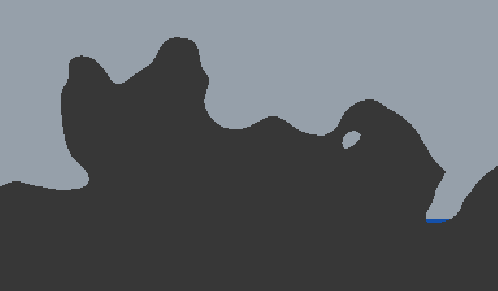
To get overhangs, the noise also needs to vary along the Y coordinate. The following is with j`"xz_scale": 1` and j`"y_scale": 1`.
|
|
|
|
|
|
|
|
## Splines
|
|
🚧 *to be continued* 🚧
|