
4.6 KiB
title, versions, tags
| title | versions | tags | |||||
|---|---|---|---|---|---|---|---|
| How terrain is generated using the noise router |
|
|
The noise router is a piece of configuration in noise settings. It's a collection of density functions, some used for the biome layout, aquifers, or ore veins.
Noise router
The different parts of the noise router and their uses.
| Density function | Usage |
|---|---|
fbarrierf fluid_level_floodednessf fluid_level_spreadf lava |
Aquifers |
fvein_togglef vein_ridgedf vein_gap |
Ore veins |
ftemperaturef vegetationf continentsf erosionf ridgesf depth |
Biome climate parameters |
finitial_density_without_jaggedness |
Approximate surface height |
ffinal_density |
Terrain |
Final density
The density function that decides the terrain is ffinal_density. This density function will be computed for every block position. If it returns a value greater than n0 the default block will be placed, otherwise either air or the default fluid will be placed.
With this information we can make the most basic noise router, one where every density function is set to n0. As predicted, this will result in a void world. Similarly, setting j"final_density": 1 will result in a world completely filled with stone.
data/minecraft/worldgen/noise_settings/overworld.json
{
  "sea_level": 63,
  "disable_mob_generation": false,
  "aquifers_enabled": false,
  "ore_veins_enabled": false,
  "legacy_random_source": false,
  "default_block": {
    "Name": "minecraft:stone"
  },
  "default_fluid": {
    "Name": "minecraft:water",
    "Properties": {
      "level": "0"
    }
  },
  "noise": {
    "min_y": -64,
    "height": 384,
    "size_horizontal": 2,
    "size_vertical": 2{#[1.18.2] ,
    "sampling": {
      "xz_scale": 1,
      "y_scale": 1,
      "xz_factor": 80,
      "y_factor": 160
    },
    "bottom_slide": {
      "target": 0,
      "size": 0,
      "offset": 0
    },
    "top_slide": {
      "target": 0,
      "size": 0,
      "offset": 0
    },
    "terrain_shaper": {
      "offset": 0,
      "factor": 0,
      "jaggedness": 0
    } #}
  },
  "noise_router": {
    "barrier": 0,
    "fluid_level_floodedness": 0,
    "fluid_level_spread": 0,
    "lava": 0,
    "temperature": 0,
    "vegetation": 0,
    "continents": 0,
    "erosion": 0,
    "depth": 0,
    "ridges": 0,
    "initial_density_without_jaggedness": 0,
    "final_density": 0,
    "vein_toggle": 0,
    "vein_ridged": 0,
    "vein_gap": 0
  },
  "spawn_target": [],
  "surface_rule": {
    "type": "minecraft:sequence",
    "sequence": []
  }
}
Flat world
Let's continue with a simple density function that creates a flat world at Y=n128. Instead of n0, we now have this as the ffinal_density:
{
  "type": "minecraft:y_clamped_gradient",
  "from_y": -64,
  "to_y": 320,
  "from_value": 1,
  "to_value": -1
}
The image below illustrates how sy_clamped_gradient works. In this example positions at Y=n-64 will get a density of n1 and positions at Y=n320 will get a density of n-1.
![illustration of Y coordinates getting mapped the [-1, 1] range](https://user-images.githubusercontent.com/17352009/170406782-f7331402-0149-47e1-871e-6aff0c1ab1be.png)
And the result looks like this:

First noise
To bring some variety to the world we need noise. We can improve the existing density function by adding a noise to it, like this:
{
  "type": "minecraft:add",
  "argument1": {
    "type": "minecraft:y_clamped_gradient",
    "from_y": -64,
    "to_y": 320,
    "from_value": 1,
    "to_value": -1
  },
  "argument2": {
    "type": "minecraft:noise",
    "noise": "minecraft:gravel",
    "xz_scale": 2,
    "y_scale": 0
  }
}
We get the following result. The height of the terrain is based on a noise that varies along the X and Z coordinates.

To make the terrain smoother, we can stretch the noise by altering the fxz_scale field. This is the result with j"xz_scale": 0.5:
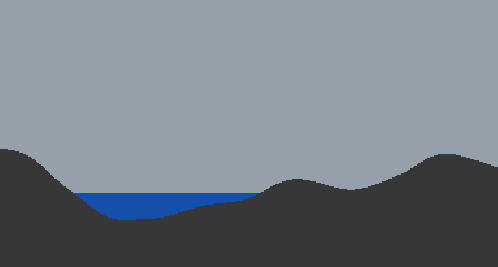
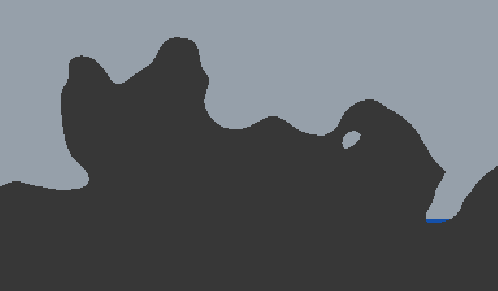
To get overhangs, the noise also needs to vary along the Y coordinate. The following is with j"xz_scale": 1 and j"y_scale": 1.
Splines
🚧 to be continued 🚧